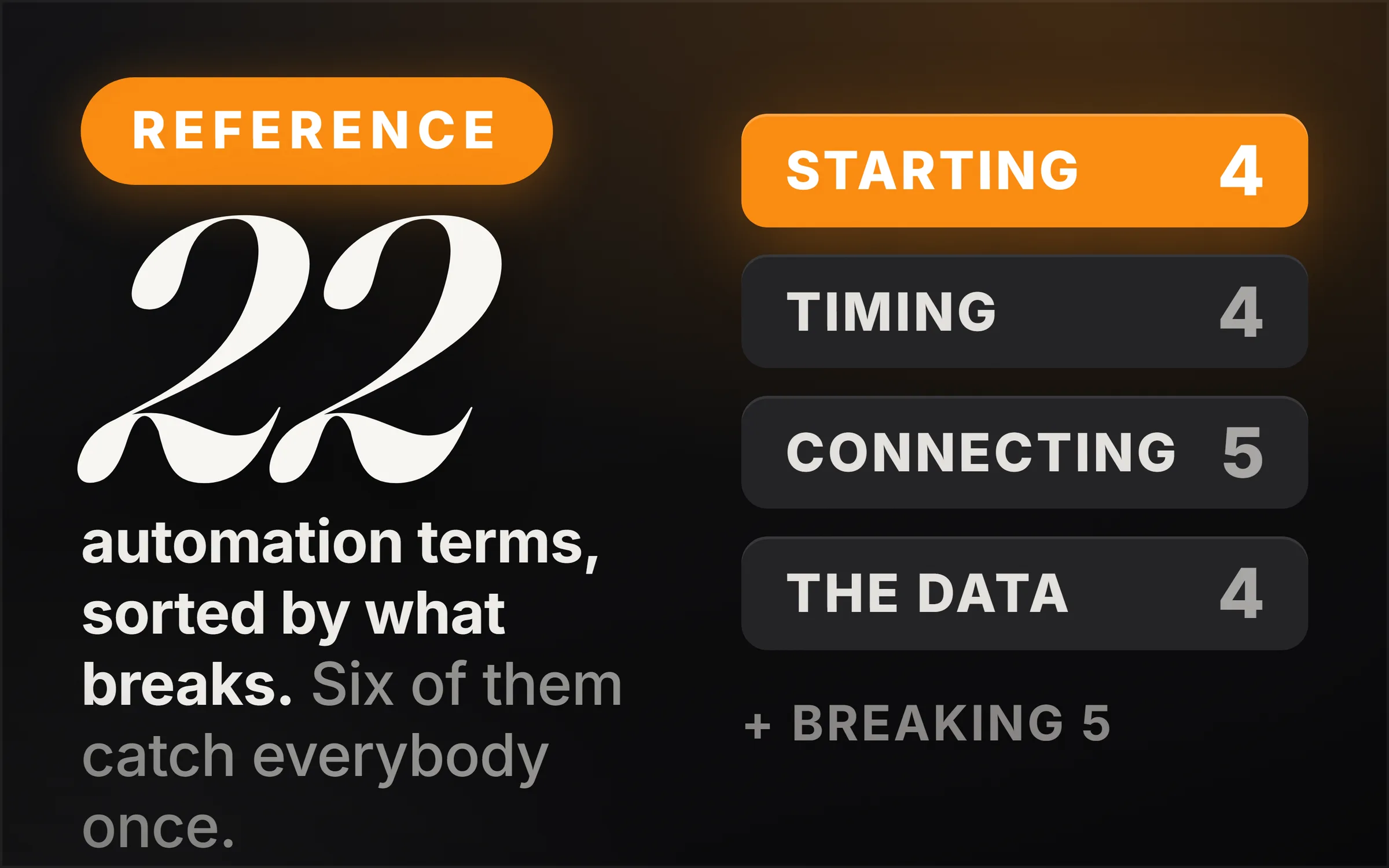
Automation terms describe the build layer of a workflow: what starts it (triggers, webhooks, polling, cron), what it connects to (APIs, JSON, rate limits), what it does to the data (parsing) and what happens when it breaks (error handling, retries, idempotency). This glossary explains 22 of them, with the six that catch almost everyone marked first.
You almost never look up an automation term out of curiosity. You look one up because something ran, reported success, and delivered nothing, and you do not have a word for what happened.
So this glossary is sorted by the failure each term names. Twenty-two words across five stages of a build, with the specification, the vendor documentation or the platform setting behind each one, and six of them singled out at the top because they are the ones that catch everybody exactly once.
The film walks the same twenty-two in build order, left to right across a canvas. This page walks them in debugging order.
Which automation terms catch people out?
If you read nothing else, read these. Each one is counterintuitive, each is written down somewhere authoritative, and each produces a bug that looks like something else.
- The cron OR rule. Restrict day-of-month and day-of-week together and the two combine with OR. Your "first Monday of the month" schedule is running far more often than you think.
- The polling gap. A polling trigger sees state, not events. A record created and deleted between two checks is invisible forever, and no error is raised.
- JSON has no date type. Dates are strings by convention. Long identity numbers get sent as strings too, because JSON has no separate whole-number type, which is why serious systems quote them.
- Rate limits are per organisation. Generating a second API key does not double your allowance, and limits are measured in several units at once, so you can sit comfortably under one and still be stopped by another.
- Retry without idempotency creates duplicates. The failure case is not "the call failed." It is "the call worked and the reply got lost."
- Mapping fails silently. On the day the other system renames a column, your expression still runs happily and quietly delivers nothing. Nothing turns red.
Everything below is the rest of the vocabulary, in the order a build actually happens.
What starts a workflow?
Workflow and agent get used as if they mean the same thing, and get sold as the same product. Anthropic wrote the cleanest separation: a workflow is language models and tools orchestrated through predefined code paths, while an agent is a system where the model dynamically directs its own process and its own tool use.
One question settles it. Who decides the order of the steps? If you drew the path in advance, you built a workflow. If the model picks its next move each time, you built an agent. Almost everything you see on a canvas is a workflow, and that is not the lesser of the two. A workflow is what you use when you already know the steps, and most of the time you do.
A trigger is the node on the far left. Nothing comes before it and everything comes after it: a new row, an incoming email, a submitted form, a time of day. The rule to learn early is that the trigger sets the ceiling for the entire run. Your workflow only carries what the trigger picked up, so if the trigger did not collect it, nothing further down can see it. Half of all "why is this field empty" questions end here.
A webhook is a URL you own, which another system calls whenever an event happens at their end. You create the address, hand it over, and from then on the details simply arrive. Stripe is direct about your side of the deal: the address has to be publicly reachable over HTTPS, and you have to answer quickly, before you start any slow work. Take too long and they treat it as a failure and send the whole thing again.
Polling is the opposite arrangement, and it is what you fall back on when the other side offers no webhook. Nobody calls you, so you keep asking on a timer. Zapier prints this difference on every trigger in their list: the ones labelled instant get pushed the moment the event happens, on any plan, and the rest check on a schedule set by your plan and by the app.
Two consequences make up the whole comparison. Polling costs you a run every time it looks, including the thousands of times it finds nothing. And polling only ever sees the state right now, so anything that happened and was undone between two checks never reaches you.
When does it run?
Cron is the scheduler that has run on Unix machines for decades, and a cron expression is the small language for writing down a time. Five fields separated by spaces, always in the same order: minute, hour, day of the month, month, day of the week. A number means at that value, a star means every value. A star in the first field gives you every minute. Thirty in the first field with the rest as stars gives you every hour on the half hour.
Then the rule that comes straight from the specification and surprises almost everybody: if you restrict the day of the month and the day of the week together, the two combine with OR, not with AND. A job set to the first of the month and to Mondays runs on every first, and on every Monday.
A scheduled trigger is that same expression wired into your builder, so you pick "every day at nine" from a dropdown and those five fields sit underneath. Two things decide whether it does what you meant. The time zone it is evaluated in, which is usually a platform setting rather than yours. And the fact that a schedule tells you when it will try and never tells you what happened, which means a run that quietly failed to fire looks exactly like a quiet day.
A queue is a waiting line for work: instead of doing a job the second it arrives, you write it down and something else picks it up when it is free. The reason queues exist is not speed, it is survival. If two thousand events land at once, a queue stops the system falling over and the line simply gets longer. n8n put it in one line in their scaling documentation: executions over your limit are held, then taken in the order they arrived.
Concurrency is how many of those jobs you let run at once. One at a time is safe and slow. Ten at a time is much faster and hits everything downstream ten times harder. In n8n it is a single production concurrency limit, and it is worth knowing that out of the box there is no limit at all.
Here is the part people have backwards: the reason to set a limit is almost never your own machine. It is the service at the other end, which has a ceiling of its own, and once you cross it, it starts refusing you.
What does it connect to?
An API is the door a company leaves open for software rather than for people. Their website is built for your eyes; their API is the same data and the same actions published at addresses a program can call, answering in a format a program can read.
Notice that every integration in every builder is this and nothing else. That tidy box with a company logo on it is somebody's code calling that company's API and hiding the details from you, which is why the limits you keep hitting are never really your builder's limits. They belong to whoever owns the door.
An API key is a long string that tells the door who you are. Anybody holding that string is you, as far as that service is concerned. Two words here get used interchangeably and should not be: authentication is who you are, authorisation is what you are allowed to do. Your key answers the first, and the scopes you ticked when you made it answer the second. There is also a practical reason keys sit in a credential store rather than in the workflow itself, which is that workflows get exported, copied and passed around, and credentials do not travel with them.
A node is one box on the canvas: one operation, input on the left, output on the right. What catches people out is what a node does when more than one row reaches it. n8n state it plainly: all data passed between nodes is an array of objects, and when a node receives that array it processes each item individually. So a node is not one action. It is one action, run again for every item that arrived.
The payload is what a request carries. A request has three parts: an address saying where it is going, headers saying how to handle it, and a body, which is the payload. Hold on to that split, because your key sits in the headers and your data sits in the body, and different parts of the system at the other end read each one. And when a webhook fires at you, the payload is whatever the sender chose to include, not everything they hold about that record. If you need something else you have to go and ask for it separately.
JSON is what the payload is almost always written in, and the formal definition is a good one: a lightweight, text-based, language-independent data interchange format. The word to underline is text, because that is genuinely all it is.
There are very few shapes to learn. Objects in curly brackets, arrays in square brackets, strings in quotes, then numbers, and true, false and null. That is the whole language. Two things are missing from that list and they catch everybody once: there is no date type, so every date you have seen in JSON is a string both sides agreed to treat as a date, and there is no separate type for whole numbers, which is why serious systems send you long identity numbers as strings.
What do you do to the data?
Parsing turns that text into something your workflow can reach into. Before it is parsed the payload is one long string with no way to ask it for a customer's email address. After it is parsed it is a structure you can walk by name. Most builders do this for you when the header says the body is JSON, which is why you hardly ever see the step, and why you will see it the moment something arrives as plain text or with one stray character in front of it.
Mapping is you saying which field over here becomes which field over there. In practice it is the dragging: email into recipient, name into first name, total into amount.
Two rules save you an afternoon. Names are exact, so a lower-case e and a capital E are two different fields. And a mapping is really a promise about a shape, so on the day the other system renames that column, your expression still runs happily and quietly delivers nothing.
A conditional is a fork in the road: ask a question about the item, send it one way or the other. Anything over five hundred goes to approval, everything else goes straight through. This is where your business rules end up living, and all the care goes into the comparison itself. Know whether the value is a number or the text of a number. Know whether an empty field counts as a missing one. And make sure both exits lead somewhere, because an item sent down a branch you never built simply stops there.
A loop runs the same steps once for every item in a list. The first thing to say is that you often have iteration already without asking for it, because a node repeats itself over each item on its own. You reach for a loop node when you need what that will not give you: fixed batches so you stay under somebody's limit, a pause between passes, or steps that depend on the result of the one before. Keep the cost in mind, because it is completely linear. A loop over a thousand rows is a thousand calls, a thousand chances to fail, and a thousand times whatever one pass costs you.
What happens when it breaks?
Error handling means deciding in advance what should happen on the bad day. If you decide nothing you get the harshest default there is: the run stops dead at the node that broke, the work before it stays done, the work after it never happens, and nobody is told.
Your platform gives you three levers. A second exit on a node for the items that failed, so the good ones keep moving. A setting to carry on regardless. Or a separate error workflow, which in n8n starts with a dedicated error trigger node and runs whenever a workflow you attached it to fails.
One boundary is worth marking, and it is the reason most "reliable" automations are not: all of that catches failures. It does not catch a step that succeeded and gave you the wrong answer, because that came back as a success like everything else.
Retry logic is making the same call again after the first one failed, and it earns its place because so many failures are temporary. A connection drops, a server is slow for a second, something is briefly overloaded.
Two settings matter. How many attempts you make, and how long you wait between them. A fixed wait is the weak version. What you want is exponential backoff, where the gap doubles each time: one second, then two, then four, then eight, so a struggling service gets quieter traffic from you rather than louder. Be selective about what you retry as well. A server error or a timeout is worth repeating. An authentication error is your side of the problem and will fail the same way forever.
A rate limit is the cap on how frequently you may call, and you will know when you hit one, because it comes back as HTTP 429, too many requests. It usually arrives with a Retry-After header naming the exact number of seconds to wait, and that is the number your backoff should use rather than one you invented.
Two details shape your whole design. These limits are counted per organisation rather than per key, so issuing yourself a second key buys you nothing. And they are measured in several units at once. Anthropic publish three: requests per minute, input tokens per minute, and output tokens per minute. You can sit comfortably under one and still be stopped by another.
Idempotent means doing something twice has the same effect as doing it once, and it is the property that makes every retry above safe.
Think about what happens if your first attempt worked and only the reply went missing on the way back. Retry that without this property and you have just created a second order. The web gives you idempotency for some methods and not others: reading something is idempotent by definition, and so is deleting it. Creating something is not, and creating is what most of your calls do.
So the fix is a key you generate yourself. Stripe accept an idempotency key header on any call that creates. They store the result of your first request under that key, then hand that same stored result back to every repeat, including the failures. Same key, same outcome, once.
A sandbox is a full copy of the service in which nothing is real: real endpoints, real responses, real webhooks firing at you, and no real money. The separation is total, and in Stripe's own words, objects in one environment cannot be accessed from the other, so a customer you created in test does not exist in live.
Here is the part that catches people, and it is a good last thing to know. Switching between them is not a toggle in a dashboard. It is the key that decides. A test key puts your call in the sandbox, a live key puts it into production, and the same workflow does completely different things depending on which one sits in that credential.
Read your last build again
Open the last automation you built and read it left to right. You now have a name for every part of it, and more usefully, a name for every way it can lie to you: the trigger that never collected the field, the poll that missed the event, the schedule that failed to fire and looked like a quiet day, the mapping that renamed itself, the retry that made two orders, and the live key sitting where a test key should be.
That list is the difference between an automation that works and an automation you can leave running, and it is also the difference between a build somebody bought once and a retainer somebody keeps paying.
For the neighbouring vocabulary, we have every AI term explained with its primary source and the seven ways an AI agent fails a paying client. If you want the business these words are for, start with the automations businesses will pay for.